When setting up a data ingestion job, there’s one sneaky little setting that can change how much data you actually get: backfill.
To help you understand it intuitively, let’s walk through a simple story — and visualize what happens when backfill is disabled vs enabled.
The Setup
Imagine you have a folder where new CSV files with customer orders are dropped. On January 1, 2025, at 10:00 AM, you kick off your shiny new ingestion job.
Here’s what’s already in the folder:
| File Name | Load Time |
|---|---|
| file1.csv | Dec 31, 2024 – 9:00 AM |
| file2.csv | Jan 1, 2025 – 9:30 AM |
| file3.csv | Jan 1, 2025 – 10:30 AM |
| file4.csv | Jan 1, 2025 – 11:00 AM |
Backfill Disabled: “I Only Look Forward”
When backfill is disabled, the ingestion engine behaves like a security guard with a strict rule:
“I start my shift at 10:00 AM. I don’t care who arrived before that. Only files after 10:00 AM get in.”
So what happens?
- ✅
file3.csvandfile4.csv(arrived after 10:00 AM) are ingested - ❌
file1.csvandfile2.csv(arrived before 10:00 AM) are ignored
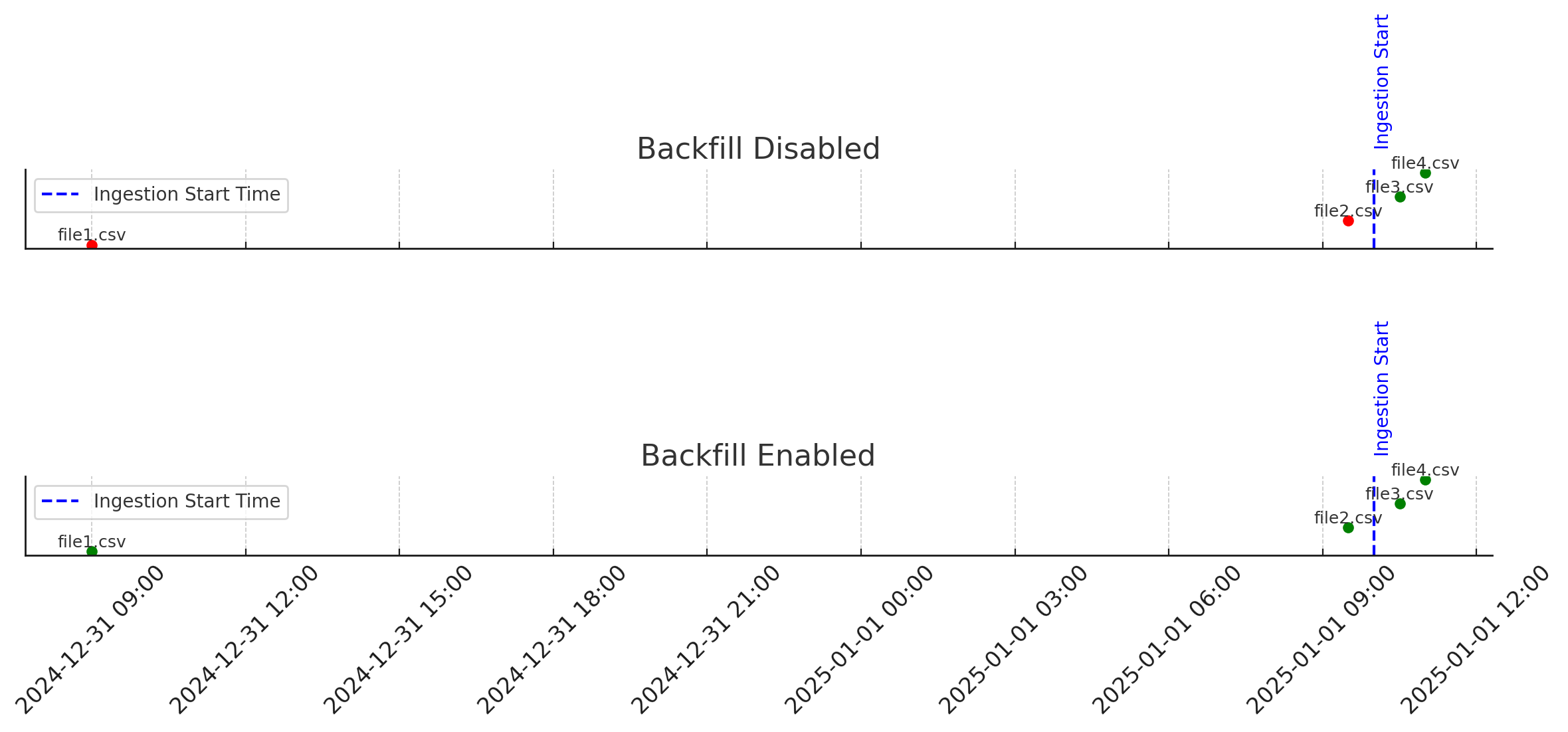
Visual:
- Green dots = ingested files
- Red dots = skipped files
- Blue dashed line = ingestion start time
Backfill Enabled: “Let’s Not Leave Anyone Behind”
Now let’s imagine backfill is enabled. The ingestion process becomes more compassionate:
“Everyone who’s already here gets in, no questions asked.”
In this case:
- ✅ All files —
file1.csv,file2.csv,file3.csv, andfile4.csv— are ingested
🔍 Visual:
- Every file is marked green — past or future relative to the start time.
Summary Table
| File Name | Load Time | Ingested (Backfill ❌) | Ingested (Backfill ✅) |
|---|---|---|---|
| file1.csv | Dec 31, 2024 – 9:00 AM | ❌ No | ✅ Yes |
| file2.csv | Jan 1, 2025 – 9:30 AM | ❌ No | ✅ Yes |
| file3.csv | Jan 1, 2025 – 10:30 AM | ✅ Yes | ✅ Yes |
| file4.csv | Jan 1, 2025 – 11:00 AM | ✅ Yes | ✅ Yes |
Final Takeaway
Backfill = Historical awareness
- If you want to include data that arrived before the ingestion process started, enable backfill.
- If you’re only interested in new data moving forward, disable it.
Leave a comment
Comments are moderated before they appear publicly.